
27
2012
Httpdisk – Mount ISO files without downloading the ISO file
 An article by
An ISO image is a file which is an image of a CD/DVD.These files have the extension .iso. Many Linux distributions and other software like Windows Automated Installation Kit are available for download as ISO image files.These files are generally used to write to CDs.
The contents of ISO image files can be accessed without writing them to CD/DVDs by using software like IMDisk which mount the ISO files to virtual CD/DVD Drives in your computer.However software like IMDisk require the entire ISO to be available locally i.e, downloaded completely.
Sometimes you may require only some particular files inside an ISO. So downloading an entire ISO just for a few files is a big waste of bandwidth . Sometimes you may also want to know the contents of an ISO before downloading it.In such circumstances Httpdisk is very useful.
HttpDisk is a virtual disk driver for Windows that uses HTTP to mount disk or CD/DVD images from a web server. It is also a demonstration on how to do network communication from kernel mode on Windows using the TDI interface.It can mount images without administrative privileges and works in Windows Vista and Windows 7 and has support for 64-bit systems.
In simple words Httpdisk mounts an ISO file stored somewhere in the internet to a virtual CD Drive in your computer without downloading the entire ISO file.You can view the contents of the ISO in your computer.You can then select the required files and copy it to your hard disk.The copying speed will approximately be equal to your download speed.This way only the required files from the ISO file are downloaded from the internet.
Installing HttpDisk
- Download Httpdisk from http://www.acc.umu.se/~bosse/ and extract it.
- Right Click on httpdisk.reg and click on Merge

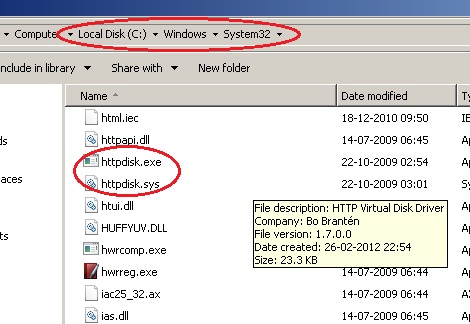
- Copy httpdisk.sys from /sys/obj/fre/i386 to Windows/System32

- Copy httpdisk.exe from /exe to Windows/System32

- You System32 folder should look like this
Httpdisk Syntax
httpdisk /umount
example:
httpdisk /mount 0 http://server.domain.com/path/diskimage.img d:
httpdisk /mount 1 http://server.domain.com/path/cdimage.iso /cd e:
httpdisk /umount d:
httpdisk /umount e:
Downloading Visual Basic 2010 Express offline installer using httpdisk
Visual Studio 2010 Express offline installer is available for download as ISO file.This ISO file contains Visual Basic,Visual C++,Visual C# and Visual Web Developer.If you only want Visual Basic then you can use httpdisk to copy only the Visual Basic Installer.This way you can avoid downloading the entire ISO.
- Copy the direct download link of Visual Studio 2010 Express ISO Images. In Firefox you can pause the download and right click to Copy the Direct Download link.Currently the download link is http://download.microsoft.com/download/1/E/5/1E5F1C0A-0D5B-426A-A603-1798B951DDAE/VS2010Express1.iso
- Open Command Prompt and run the following commandhttpdisk /mount 0 http://download.microsoft.com/download/1/E
/5/1E5F1C0A-0D5B-426A-A603-1798B951DDAE/VS2010Express1.iso /cd f:
- You can browse F: Drive and copy the files required to your hard disk.
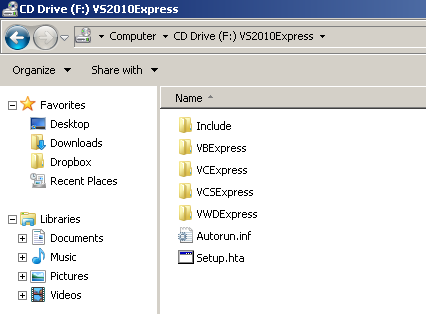
- After you finish copying the required files you can unmount the virtual CD Drive byhttpdisk /umount f:

Filter Drivers – Removable Media as Fixed Disk in Windows »


About the Author: Bharat Balegere
Bharat Balegere is a 27 year old blogger from Bengaluru. He is a technology enthusiast and loves tinkering with computers and usb drives.
Is there any way that i could mount a Torrent iso??