
26
2008
Automatically Install All Missing Drivers
 An article by
Question 1:How does an average person (System Admin) install drivers?
Answer:He manually installs each and every missing drivers using wither the respective product CD’s or he downloads the drivers from the respective manufacturer’s site.
Question 2:How does an intelligent person (System Admin) install drivers?
Answer:He just plugs in a USB drive and all missing drivers are automatically installed.
How do you do that?
We make use of collection of drivers known as DriverPacks
Create a folder C:\Driverpacks
Download whichever driverpacks you want from Driverpacks.net to C:\Driverpacks
Download DriverForge from Softpedia to C:\Driverpacks

In the above screenshot I have downloaded Chipset and LAN DriverPacks
Now copy the Folder Driverpacks to your USB drive.
Create a autorun.inf file
Open notepad
Copy and paste this code
[AutoRun]
open=Driverpacks\setup.exe
Save it as “autorun.inf” .You must include the quotes or notepad will save it as autorun.inf.txt
Now plug in the usb driver on any computer.DriverForge automatically starts.
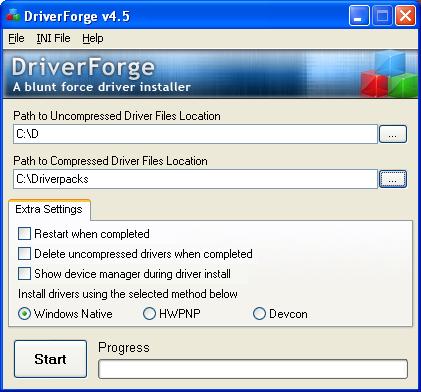
Choose the correct path to your compressed drivers i.e the DriverPacks Folder on your USB Drive.
Then click on Start and wait while all your drivers are installed automatically.
Also Click on Help for configuring more advanced options of DriverForge.
Reference:http://www.msfn.org/board/DriverForge-v45-The-Blunt-Force-Autom-t110783.html

Automatically Install Drivers 2 »


About the Author: Bharat Balegere
Bharat Balegere is a 27 year old blogger from Bengaluru. He is a technology enthusiast and loves tinkering with computers and usb drives.
Thanks for the DriverForge tip. Looks like it’s gonna come in handy this week.